What Is WebAssembly and Why It Makes Your Web Tools Faster
WebAssembly lets you run powerful software directly in your browser, with nothing to install. We explain what it is, how it works, and why it changes online tools.
Quick summary: WebAssembly (WASM) is a technology that lets very fast programs run inside the browser, with performance close to an installed application. Thanks to it, tasks that previously required a server (compressing images, decoding formats, processing video) can now be done directly on your device, with nothing uploaded.
A few years ago, if a website needed to do something heavy — compress a video, decode an exotic image format, run an AI algorithm — it could only do so by sending your files to a powerful server. Your browser was too slow for that kind of computation. WebAssembly changed that.
What WebAssembly is in simple terms
WebAssembly is a code format that browsers can run very fast. It's not JavaScript: it's a compiled format, closer to machine language, that runs at nearly the same speed as a program installed on your computer. Developers write code in languages like C, C++, or Rust, compile it to WebAssembly, and the result can run inside any modern browser.
Think of it as a powerful engine inside your browser. JavaScript is the everyday engine, good for interfaces and light logic. WebAssembly is the high-performance engine, for heavy tasks that only a server could do before.
What it can do that wasn't possible before
- Decode image formats the browser doesn't natively support. For example, the iPhone's HEIC format: the browser can't open it, but a WASM library (like heic2any) decodes it on your device.
- Encode formats with better compression. WebP in browsers that don't natively support it (like older Safari versions) can be encoded with a WASM encoder.
- Process video without a server. FFmpeg, the professional video engine used by studios, is compiled to WebAssembly and can transcode videos inside the browser.
- Run AI algorithms locally. Image recognition, voice transcription, or background removal models can run in WASM without sending data to the cloud.
Why it matters for your privacy
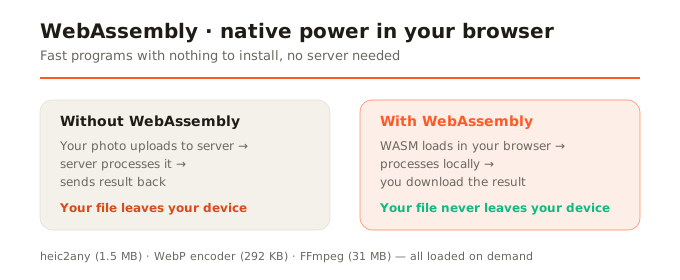
Here's the key connection: if heavy processing happens inside your browser thanks to WebAssembly, your files don't need to leave your device. A tool that compresses images with WASM doesn't need a server; one that converts HEIC with WASM doesn't need to upload your photos to the cloud. It's the technology that makes real privacy-first tools possible: not those that promise not to look at your files, but those that technically can't because they never receive them.
What limitations it has
WebAssembly isn't magic. It has real limitations: it's slower than the same code running directly on your operating system (the penalty is usually 10-30%); WASM files can be large (FFmpeg's core weighs 31 MB, for instance, though it's cached after the first download); and not all programs are compiled to WASM (the offering is growing but not universal). Also, on mobile devices, processing power is less than on a computer, so heavy tasks (like video transcoding) take longer.
How SocialShrink uses it
At SocialShrink we use WebAssembly for everything the browser can't do on its own: decoding HEIC (via heic2any compiled to WASM), encoding WebP in browsers without native support (via a WebP WASM encoder), and processing video (via FFmpeg WASM). For standard JPG and PNG image compression, we use the browser's native Canvas API (which is already fast and doesn't need WASM). All WASM libraries load on demand: they only download when you need them, to avoid slowing the initial page load.
In summary
WebAssembly is the technology that lets your browser do things only a server could before: compress video, decode exotic formats, run heavy algorithms. For you as a user, it means faster tools that don't need to upload your files anywhere. For privacy, it's a fundamental shift: the processing stays on your device.