WebP vs JPG in 2026: Which to Use and When (real comparison)
WebP weighs less than JPG at the same quality, but JPG remains the most compatible. We explain when to choose each with real data, not marketing.
Quick summary: WebP weighs 25-35% less than JPG at the same visual quality, and it also supports transparency. But JPG remains the format that opens absolutely everywhere. In 2026, the choice depends on where the image is going: if it's for your own website, WebP; if it's for sharing or any other destination, JPG is the safe bet.
JPG has been the world's default image format for over 30 years. WebP is just over a decade old, designed by Google to replace it. Has it succeeded? Partially. The two coexist because each has real advantages the other doesn't fully cover. Let's compare them without marketing.
JPG: what it does well and what it doesn't
JPG (JPEG) is a lossy format that compresses photographs excellently. Its great strength is universal compatibility: it opens on any device, any browser, any editing program, any operating system, no matter how old. No other image format has as much compatibility. Its weakness: at medium-low quality levels, visible artifacts appear (the typical blurry blocks in gradients). And it doesn't support transparency: if you need a transparent background, JPG can't do it.
WebP: what it does well and what it doesn't
WebP is a format developed by Google that uses more modern compression than JPG. At the same visual quality, a WebP file weighs 25-35% less. It also supports transparency (like PNG) and animation (like GIF), all in one lightweight format. Its weakness: although in 2026 compatibility is very high (Chrome, Firefox, Safari, Edge all support it), some old desktop programs don't open it, and certain platforms or corporate systems still don't accept it.
The comparison in numbers
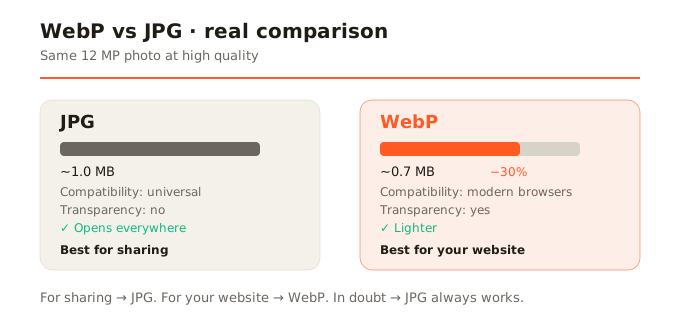
For a typical 12-megapixel phone photograph at high quality (visually identical to the eye): in JPG it weighs around 800 KB to 1.2 MB; in WebP it weighs between 500 KB and 800 KB. The difference is consistent and real. It's not the magical 80% reduction some sites claim, but 25-35% less weight for the same quality is significant, especially with many images on a website.
When to use JPG
- Photos you'll share by email, messaging, or social networks: JPG works everywhere without surprises.
- Images that users with varied devices and software will download: you can't assume everyone opens WebP.
- When universal compatibility matters more than file weight.
- Printing: photo printing services accept JPG universally.
When to use WebP
- Images for your own website: WebP reduces load time and improves experience. All modern browsers support it.
- When you need transparency with low weight: WebP with transparency weighs much less than PNG.
- Web performance optimization: every KB counts for Core Web Vitals and SEO.
- When you control the destination: if you know the recipient uses a modern browser or app.
What if the browser doesn't support WebP
In 2026 this is rare but possible, especially in old Safari versions or some desktop programs. The solution for websites is to serve WebP with a JPG fallback (using HTML's picture element). In SocialShrink, if the browser can't natively encode WebP, a WebAssembly encoder is used as fallback, or it falls back to JPG with a visible notice.
In summary
WebP is objectively better than JPG in efficiency (less weight, same quality, transparency). But JPG remains irreplaceable in universal compatibility. Use WebP for your website and modern destinations; use JPG when you need the image to work anywhere without thinking. And if in doubt, JPG is the safe bet.