Video Formats for Social Media: A Practical Guide for 2026
MP4, MOV, WebM, H.264, H.265... Which video format do you need for each social network? A clear guide without jargon, with the resolution and ratio for each platform.
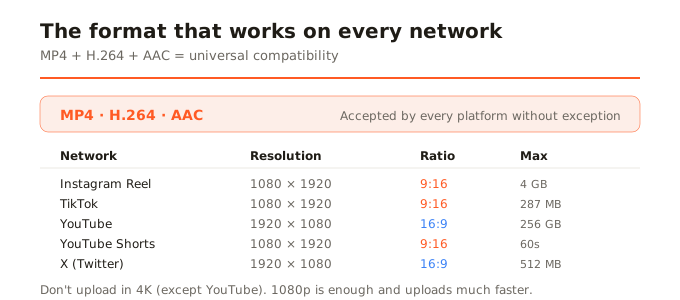
Quick summary: For social media, always use MP4 with H.264 codec and AAC audio. It's the most compatible format in the world, accepted by every platform without exception. Resolution: 1080p vertical (1080x1920) for Reels, TikTok, and Shorts; 1080p horizontal (1920x1080) for YouTube; and 1080x1080 for square posts.
The digital video world has an alphabet soup of acronyms: MP4, MOV, AVI, WebM, MKV for containers; H.264, H.265, VP9, AV1 for codecs; AAC, MP3, Opus for audio. If you just want to upload a video to Instagram or YouTube and have it look good, you don't need to understand all that. You need to know what to choose, and it's simpler than it seems.
Container vs codec: the difference that matters
A container (MP4, MOV, WebM) is the wrapper: the file that holds the video, audio, and metadata. A codec (H.264, H.265) is how the video is compressed inside that wrapper. Two MP4 files can use different codecs inside. For social media, the winning combination is: MP4 container + H.264 codec + AAC audio. Works everywhere.
What each platform accepts
- Instagram: MP4 with H.264. Max 4 GB. Recommended: 1080p, high bitrate, AAC audio. Also accepts MOV.
- TikTok: MP4 or MOV. Max 287 MB from mobile, 10 GB from web. 1080x1920 ideal.
- YouTube: MP4 with H.264 is recommended. Also accepts MOV, AVI, WebM, MKV, and more. Max 256 GB or 12 hours.
- X (Twitter): MP4 with H.264 and AAC audio. Max 512 MB, 140s duration.
- LinkedIn: MP4. Max 5 GB, between 3s and 10min.
- Facebook: MP4 with H.264. Max 10 GB, 240 min.
H.264 vs H.265: which to use
H.264 (also called AVC) has been the standard for over 15 years. Every platform, every device, and every browser plays it. H.265 (HEVC) compresses better (same quality at 30-50% less weight), but compatibility isn't universal: some browsers and platforms don't support it well. For social media, always use H.264: you gain nothing with H.265 because the platform re-compresses anyway.
The correct resolution
Don't upload in 4K to social networks (except YouTube where it makes sense). Instagram, TikTok, and most platforms show video at 1080p maximum. Uploading in 4K only means a 4x larger file, more upload time, and the platform will downscale to 1080p anyway. Better to upload at 1080p with good quality.
MOV vs MP4
MOV is Apple's native format (iPhone videos are recorded in MOV). MP4 is the universal standard. Both can contain the same H.264 codec inside. The practical difference is that MOV can include codecs not all systems understand (like ProRes), and weighs slightly more due to its metadata. For social media, convert to MP4 before uploading: it's lighter and more compatible.
In summary
For social media: MP4 + H.264 + AAC, at 1080p, with the platform's ratio (9:16 vertical for Reels/TikTok/Shorts, 16:9 horizontal for YouTube, 1:1 square for posts). Don't upload in 4K except for YouTube. And remember: compressing before uploading produces better final quality than letting the platform crush your original file.