Image Size and Format for Every Social Network in 2026 (complete guide)
Every social network has its ideal image size. Updated table of dimensions for Instagram, TikTok, YouTube, X, LinkedIn, Pinterest, and Facebook, with the recommended format for each.
Quick summary: Every social network has its ideal image size, and uploading a photo in the wrong aspect ratio makes it crop badly or lose sharpness. This is the updated table of dimensions for Instagram, TikTok, YouTube, X, LinkedIn, Pinterest, and Facebook in 2026, with the recommended format for each. Save it: it'll spare you headaches.
You've prepared a perfect image, you upload it to Instagram… and the network crops off the head, or it shows up with bars on the sides, or it looks blurry. It's not your fault: each platform expects a specific size and aspect ratio, and when you don't give it what it wants, it does whatever it likes with your image. In this guide you have the correct 2026 dimensions for every network, explained without jargon, so your posts always look the way you intended.
Why image size matters so much
When you upload an image that doesn't fit the aspect ratio the network expects, two things can happen, and neither is good. Either the platform automatically crops your image to make it fit—and it rarely crops where you'd want—or it rescales and compresses it aggressively, leaving it blurry or full of artifacts. Uploading the image at the correct size and ratio gives you control: you decide what's shown and at what quality.
There are two key concepts worth being clear on. The aspect ratio is the relationship between width and height: 1:1 is a square, 9:16 is full-screen vertical, 16:9 is horizontal. The resolution is the actual pixels (for example 1080×1080). What matters most is respecting the ratio; the resolution should be high but not excessive.
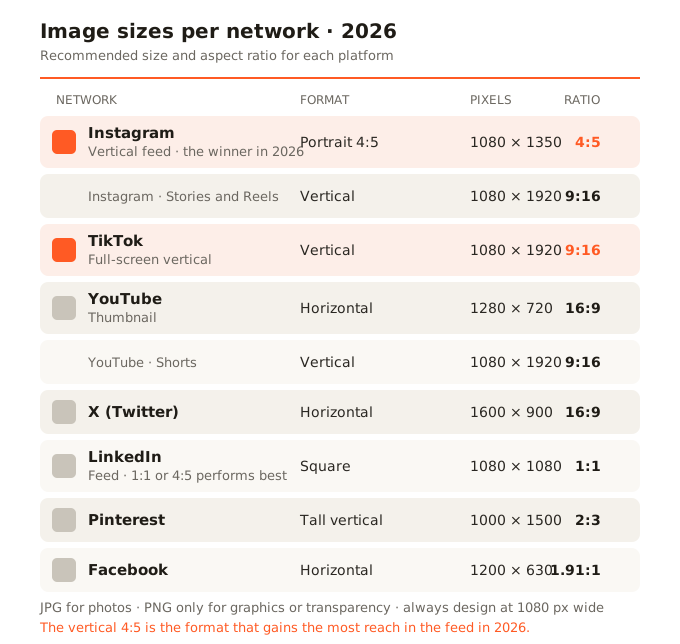
Instagram is probably the network where getting it right matters most, because it mixes several formats:
- Square feed: 1080 × 1080 px (1:1 ratio). The classic, safe for any post.
- Vertical feed (portrait): 1080 × 1350 px (4:5 ratio). It takes up the most space in the feed and therefore grabs the most attention. In 2026 it's the format recommended by Meta.
- Stories and Reels: 1080 × 1920 px (9:16 ratio). Full-screen vertical.
TikTok
TikTok is purely vertical: 1080 × 1920 px (9:16), full screen. Any other ratio will leave bars or get cropped. For both video and post images, always think vertical.
YouTube
YouTube combines two formats depending on the content type. The thumbnail is 1280 × 720 px (16:9)—it's the image that decides whether someone clicks your video, so it deserves care. Shorts are 1080 × 1920 px (9:16), vertical like TikTok or Reels.
X (formerly Twitter)
For X, the horizontal 16:9 format works best in the timeline, with a recommended resolution of 1600 × 900 px. Square images work too, but horizontal ones make better use of the card's space.
On LinkedIn, post images perform well in square 1080 × 1080 px (1:1) or vertical 4:5 in the feed, which take up more screen than horizontal. It's a more professional network, and clean, well-sized images convey seriousness.
Pinterest is the tall vertical exception: the ideal format is 1000 × 1500 px (2:3 ratio). Vertical pins take up more space in the feed and get more visibility. It's a network built for tall images.
For Facebook posts, 1200 × 630 px is a safe and versatile measurement, in horizontal format, that looks good both in the feed and when sharing a link.
Which file format to use on each network
With the size question settled, the format question remains. The rule is simple:
- For almost all posts, use JPG. It's light, universal, and more than enough for photos. Every network accepts it without issue.
- Use PNG only when you need maximum sharpness in graphics with text, logos, or images with transparency. Don't use it for photos: it weighs much more with no visible benefit.
- WebP is excellent for its light weight and is now accepted on most platforms in 2026, but check that the specific one supports it before relying on it.
One important detail: every network re-compresses the images you upload. That's why it's worth uploading an already well-optimized image—at the correct size and good quality—so the platform's re-compression starts from a good base and doesn't ruin your photo.
The most common mistake: one image for every network
Here's the problem almost everyone runs into: you have a good photo, but a single image doesn't fit every aspect ratio at once. The one that's perfect in Instagram's square feed crops terribly as a vertical story, and vice versa. The professional solution is to adapt the same image to each format: generate the square version, the vertical 9:16, the 4:5, the horizontal one… each cropped and sized for its network. Doing it by hand, one at a time, is tedious. That's why there are tools that take your image and generate every format at once, cropping intelligently for each ratio.
In summary
Respecting each network's size and aspect ratio is the difference between posts that look professional and posts that are cropped or blurry. Save this guide's dimensions, use JPG for most cases, and when you need the same image in several formats, adapt it to each one instead of uploading the same to all.