How to Remove EXIF Metadata from Your Photos (and why you should)
Your photos carry hidden data: GPS location, phone model, exact date and time. We explain what EXIF metadata is, why it matters for your privacy, and how to remove it.
Quick summary: Every photo you take with your phone carries invisible metadata (EXIF data) including your exact GPS location, phone model, date and time, and even camera settings. When you share that photo, you share all that information too. Removing it is easy, and we explain how.
You've emailed a photo, uploaded it to a forum, or shared it in a group chat. What you probably didn't know is that image had an invisible data sheet attached with personal information. This isn't some exotic security flaw: it's the standard behavior of any modern digital camera or smartphone. And most people have no idea it's there.
What EXIF metadata actually is
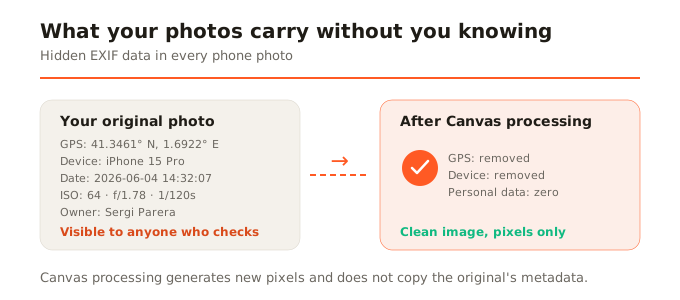
EXIF (Exchangeable Image File Format) is a standard that cameras and phones use to attach technical information to every photo. It's like an invisible label sewn into the image. It typically includes: GPS coordinates of where the photo was taken, exact date and time, device brand and model, image resolution and size, camera settings (aperture, shutter speed, ISO), image orientation, and in some cases, the device owner's name.
This data is useful for organizing your personal photo library, for professional editing (knowing what settings you used), or for geotagging in map applications. The problem is when you share it without knowing.
Why it matters for your privacy
Imagine you upload a photo of something you're selling online. That photo might carry the GPS coordinates of your home. Or you send a photo to a stranger and you're telling them exactly where and when you took it, with which phone, and sometimes even your name. It's not paranoia: it's information that's right there, readable by anyone who knows how to look, with tools as simple as right-clicking and viewing file properties.
Major social networks (Instagram, Facebook, Twitter) usually strip EXIF metadata when you upload a photo, precisely for privacy reasons. But many other channels don't: email, forums, classifieds websites, messaging groups (WhatsApp strips EXIF; Telegram depends on configuration), and any site where you upload the image directly.
How to view a photo's metadata
On a computer, right-click the image file and look for Properties or Get Info. In the details tab you'll see all the EXIF data: GPS, camera, date. On an iPhone, open the photo in the Photos app and swipe up to see the map with the location and technical data. There are also web tools and applications that display EXIF data in detail.
How to remove metadata
There are several ways to do it. The most practical for daily use is to use a tool that processes the image and, in doing so, automatically removes the EXIF data. This is where browser canvas processing comes in: when an image is processed through the Canvas API (which is what SocialShrink uses to compress, convert, or resize), the result is a clean image with no metadata. The canvas generates new pixels; it doesn't copy the original's metadata.
This means every time you compress or convert an image with SocialShrink, EXIF metadata is automatically removed. It's not an option you need to enable: it's inherent to the process. The image you download carries no GPS, no phone model, no capture date. Clean by default.
When you might want to keep them
You won't always want to remove them. If you're a professional photographer, metadata helps you remember each shot's settings. If you use a photo organization app by place and date (like Google Photos or Apple Photos), metadata is what enables that organization. The key is being aware of when you're sharing them and with whom.
In summary
Your photos carry more information than you see. EXIF metadata includes location, device, date, and technical data that can compromise your privacy when shared. Removing it is as simple as processing the image through a canvas-based tool like SocialShrink, where it's automatically stripped with every conversion or compression.