Privacy in Online Tools: What Really Happens to Your Files
When you use an online tool for your photos or videos, where do your files end up? Not all services are the same. We explain the differences and how to protect your privacy.
Quick summary: Most online image and video tools upload your files to their servers for processing. You don't know how long they keep them, who sees them, or what they use them for. There's an alternative: tools that process everything in your browser, without your files ever leaving your device. The difference matters more than you think.
You need to compress a photo, convert a format, or resize a video. You search Google, click the first tool that comes up, drag your file, and done. Have you ever wondered what happens to that file between when you drag it and when you download it? The answer isn't trivial, and it varies enormously between services.
The traditional model: server-side processing
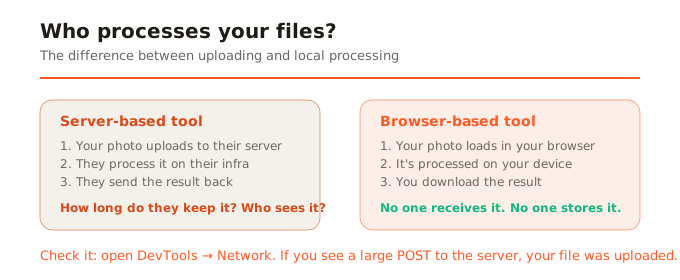
The vast majority of online tools work like this: your file is uploaded to the company's server, processed there, and the result is sent back for download. Your file travels across the internet, is stored temporarily (or not so temporarily) on a server, and then supposedly gets deleted. But you have no way to verify it.
The uncomfortable questions are: how long do they keep your file? Most say they delete it in minutes or hours, but you can't check. Who has access to the server? The company's employees, system administrators, potentially anyone with access to that infrastructure. Do they use your files for anything else? Some free services have been caught using uploaded images to train AI models, without telling users.
The modern model: in-browser processing
Thanks to technologies like WebAssembly and the Canvas API, it's now possible to do heavy processing directly in your browser. Your file loads into the browser's memory, gets transformed right there, and you download the result. At no point does the file leave your device. No internet trip, no server receiving it, no database storing it.
It's not a matter of trust (we don't look at your files): it's a technical matter (we can't look at them because we never receive them). When privacy is in the architecture and not in a promise, it can't fail due to human error, a hack, or a change in company policy.
How to tell if a tool uploads your files
There's a simple way to check: open the browser's developer tools (F12 in most browsers), go to the Network tab, and process a file. If you see an upload request (a large POST to the server), your file was uploaded. If you don't see any significant transfer, the processing is local. You can also disconnect from the internet after the tool loads: if it keeps working, it's truly local processing.
What types of files matter most to protect
Think about what we actually process with these tools daily: family photos, photos of children, scanned ID documents, screenshots with banking details, property photos, confidential work content, medical images. These aren't landscape photos: they're files with personal information you wouldn't want ending up in unknown hands.
The fine print of free
Many free tools are funded by their users' data, not visible advertising. The image you upload may be analyzed, indexed, or used as training data. The terms of service of some free services include clauses granting them license over the content you upload. It's not always malicious, but it's rarely transparent.
What we do at SocialShrink
At SocialShrink, all processing happens in your browser. We have no processing servers. We have no file database. We have no access to what you process. The free version is funded by Google display ads (which have no access to your files, processed in a separate thread). It's a transparent business model: you see ads; we never see your photos.
In summary
Not all online tools are the same. Most upload your files to a server and you depend on their good faith. Those that process in your browser can't access your files because they never receive them. For something as personal as your photos, documents, and work images, that architectural difference is the only real guarantee of privacy.