How to Compress Video for Instagram, TikTok, and YouTube Without Losing Quality
Phone videos are too heavy to upload quickly to social media. We explain how to compress them while keeping quality, with the exact dimensions for each platform.
Quick summary: Videos recorded on phones can weigh hundreds of megabytes per minute. Uploading them as-is to social media is slow, eats data, and the platform aggressively re-compresses them anyway. Compressing before uploading, adjusting resolution and bitrate to the network's format, gives you control over quality and massively reduces upload time.
You record a 30-second video on your phone and it weighs 150 MB. You try to upload it to Instagram and it takes forever, or outright fails. You send it via WhatsApp and the quality is destroyed because the service brutally re-compresses it. The problem is the same as with photos, but multiplied: video weighs much more and compression matters much more.
Why phone videos weigh so much
Modern phones record in 4K (3840x2160) at 30 or 60 fps by default. One minute of 4K video at 60 fps can weigh 400 MB or more. Even at 1080p, one minute can exceed 100 MB. For social networks, which display video at 1080p maximum and usually re-compress everything you upload, that resolution and weight are completely unnecessary.
What each social network needs
- Instagram Reels/Stories: 1080x1920 (9:16 vertical), max 90s for Reels, 60s stories. Recommended weight: as low as possible while maintaining quality.
- TikTok: 1080x1920 (9:16), up to 10 minutes. TikTok re-compresses aggressively, so uploading a well-compressed video from the start helps final quality.
- YouTube: 1920x1080 (16:9) for regular videos, 1080x1920 (9:16) for Shorts. YouTube accepts large files but processes lighter ones faster.
- Square post (Instagram/Facebook): 1080x1080 (1:1).
Compress vs re-compress: why you should do it
When you upload a video to a social network, the platform re-compresses it with its own settings. If you give it a 400 MB 4K video, it will crush it until it fits their pipeline, and you don't control how. The result is usually worse than if you had given it an already-compressed video at the correct resolution. Counterintuitively, uploading an optimized 1080p video produces better final quality than uploading 4K and letting the network destroy it.
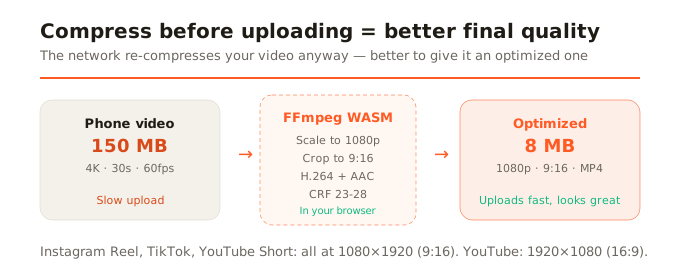
H.264: the codec that works everywhere
H.264 is the world's most compatible video compression standard. Every social network, every browser, and every device plays it. If you're going to upload a video to any platform, encoding it in H.264 inside an MP4 container is the safest bet. More modern codecs exist (H.265/HEVC, AV1) with better compression, but compatibility isn't universal.
How to compress a video for social media, step by step
- Open the video tool in your browser. No editing software to install.
- Upload your video (MP4, MOV, or WebM). It loads in your browser, nothing is uploaded to any server.
- Choose the destination: Instagram Reel, TikTok, YouTube, etc. The tool automatically applies the correct resolution and ratio.
- If the format changes the ratio (from horizontal to vertical, for example), adjust the crop by dragging.
- Process. The FFmpeg engine encodes to H.264 with AAC audio. You see real-time progress.
- Download the optimized MP4 and upload it to the network. It will upload much faster and quality will be better than uploading the uncompressed original.
A tip about quality
Don't lower quality more than necessary. A CRF (quality factor) of 23-28 is the typical range for social media: it produces light videos with excellent visual quality. Using a lower CRF (better quality) produces larger files that the network will re-compress anyway. Using a higher one (worse quality) is noticeable. The sweet spot is in the middle.
In summary
Compressing video before uploading to social media gives you control over quality, massively reduces upload time, and paradoxically produces better final results than letting the platform crush your 4K video. Adjust to the network's resolution (1080p is enough for all), encode in H.264 MP4, and upload an already-optimized file.