Why Processing Your Images in the Browser Is More Private Than Uploading Them
Most websites upload your photo to their server to process it. There's another way: doing it in your browser, without the file ever leaving your device. More private, faster, and with no limits.
Quick summary: Most websites that convert or compress images upload your photo to their server to process it. There's an alternative: doing all the work inside your own browser, without the file ever leaving your device. It's more private, faster, and works with no limits. We explain the difference and why it matters.
When you drag a photo onto a website to convert, compress, or resize it, have you ever wondered where that process actually happens? The answer surprises a lot of people, and it has direct consequences for your privacy. Let's explain it simply, because understanding this changes how you choose your tools.
What happens when you upload a photo to a converter website
Most online tools work the same way, even if they don't say so clearly: when you drop your image, they send it to their server—a remote computer owned by that company—process it there, and send the result back. That means your photo, during that process, leaves your device and travels to a machine you don't own.
And that's where the uncomfortable questions arise: what does that company do with your image? How long does it keep it? Does it use it to train some system? Who has access to that server? In most cases, you have no way of knowing. You trust blindly. For a photo of a landscape maybe you don't care. But think about what we usually convert or compress: family photos, scanned documents, screenshots with personal information, confidential work images.
Server-side vs in-browser processing
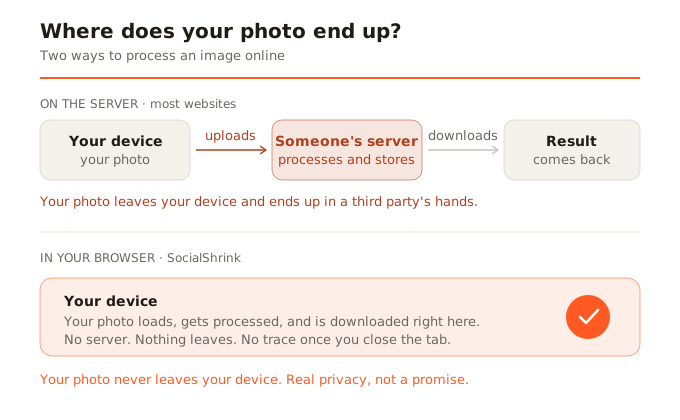
Here's the key distinction, and it's simpler than it seems. Server-side processing is the traditional model: your file is uploaded to a remote computer, which does the work and sends the result back. Your file travels. Client-side processing is the modern model: all the work happens on your own device, inside your browser. Your file never leaves your computer or phone. There's no trip, no server receiving anything.
How all this is possible in the browser
You might think: but processing images or video is heavy—can a browser really do it? The answer is that modern browsers are far more powerful than people think. Years ago, tasks like compressing an image with quality or transcoding a video could only be done on powerful servers. Today, thanks to technologies like WebAssembly (which lets very fast programs run directly in the browser) and the Canvas API (which manipulates images at the pixel level), your browser can do that same work locally. Even video: there are versions of professional engines like FFmpeg compiled to run inside the browser.
What you gain with local processing
- Real privacy: your files don't leave your device. No one sees them, no one stores them, no one can leak them. It's not a promise of "we don't look at your photos": it's that they technically can't, because they never receive them.
- Speed: there's no waiting to upload the file or download the result. The process is local and immediate.
- Works offline: once the tool is loaded, it can work without internet, because it doesn't depend on any server.
- No artificial limits: since there's no server to pay for each conversion, there's no reason to limit the number of files or ask you to register.
Why we built SocialShrink this way
This isn't a casual technical decision: it's SocialShrink's reason for being. We believe that compressing a photo for Instagram or converting an iPhone HEIC shouldn't cost you your privacy. You shouldn't have to trust your images to an unknown server for such an everyday task. That's why all our processing happens in your browser, with nothing uploaded. It's not a marketing slogan: it's an architecture decision. We don't have servers that receive your files because we don't want to have them. Made with care, not with servers.
In summary
Next time you use an online tool for your images, ask yourself where they're processed. If they're uploaded to a server, you're entrusting your files to a third party. If they're processed in your browser, your images never leave your device. For something as personal as your photos, that difference matters.