How to Adapt One Image to Every Social Network at Once
A single image doesn't fit every network. We explain how to generate all versions (square, vertical, horizontal) at once, with the exact dimensions for each platform.
Quick summary: Each social network has its own image size. A square photo for Instagram crops badly in stories; what works on YouTube doesn't fit TikTok. The professional solution isn't uploading the same to all, but generating an adapted version for each: cropped to the correct ratio, resized to the exact pixels, and compressed. It can be done in one step.
If you manage social media, create content, or simply post on multiple platforms, you know the problem: you have a good photo, but you need different versions for each network. Instagram wants square or 4:5 for the feed, 9:16 for stories. TikTok wants 9:16. YouTube wants 16:9 for thumbnails. And if you upload the same image to all, each platform crops it its own way, almost never where you'd want.
The one-image-for-everything problem
A horizontal photo works well as a YouTube thumbnail, but in Instagram stories almost everything gets cut. A vertical photo is perfect for TikTok, but in Twitter's feed it shows with bars. It's not that networks are picky: each is designed for a specific visual experience (vertical scroll, full screen, horizontal feed), and the proportions reflect that.
The result of using the same image everywhere is that on at least half the networks it looks bad: cropped, barred, off-center, or blurry from aggressive rescaling.
The solution: multiformat from one image
The professional approach is to start from a good-resolution image and generate adapted versions for each platform. For each network: crop to the correct ratio (1:1, 4:5, 9:16, 16:9...), center the frame on what matters, resize to the exact pixels the network expects, and compress so it weighs as little as possible without visible quality loss.
Each network's ratios in 2026
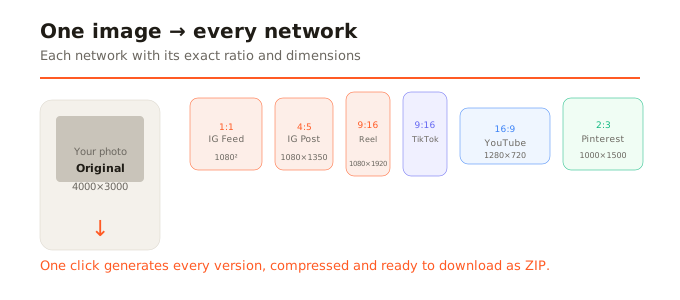
- Instagram feed: 1080x1080 (1:1) or 1080x1350 (4:5, recommended).
- Instagram Stories / Reels: 1080x1920 (9:16).
- TikTok: 1080x1920 (9:16).
- YouTube thumbnail: 1280x720 (16:9).
- YouTube Shorts: 1080x1920 (9:16).
- X (Twitter): 1600x900 (16:9).
- LinkedIn: 1080x1080 (1:1) or 4:5.
- Pinterest: 1000x1500 (2:3).
How to do it in one step
With a multiformat tool like SocialShrink, the process is: upload a photo, check the platforms you need, adjust the crop if you want (or leave automatic centering), and generate all versions at once. Each comes out cropped to the exact ratio, resized to the platform's pixels, and compressed. You download a ZIP with all versions named by network and format.
What would manually take opening Photoshop or Canva six times, cropping each time, saving each version with a different name, and uploading one by one, is solved in a single click.
Framing matters
When you crop a horizontal photo to vertical format, you lose the sides. When you crop a vertical to square, you lose top and bottom. What matters is that what stays inside the frame is the important part: the face, the product, the text. A centered crop works well in most cases, but sometimes you need to shift the frame manually. Good tools let you adjust the crop point per format, so each version shows exactly what you want.
In summary
Don't upload the same image to every network and hope for the best. Adapt: generate a version for each platform with its own ratio, dimensions, and optimized weight. Do it in one step with a multiformat tool, adjust the crop where needed, and download everything ready. It's the difference between professional-looking posts and wildly cropped ones.